
路由重写、WebSocket、CORS 与转发头排障手册
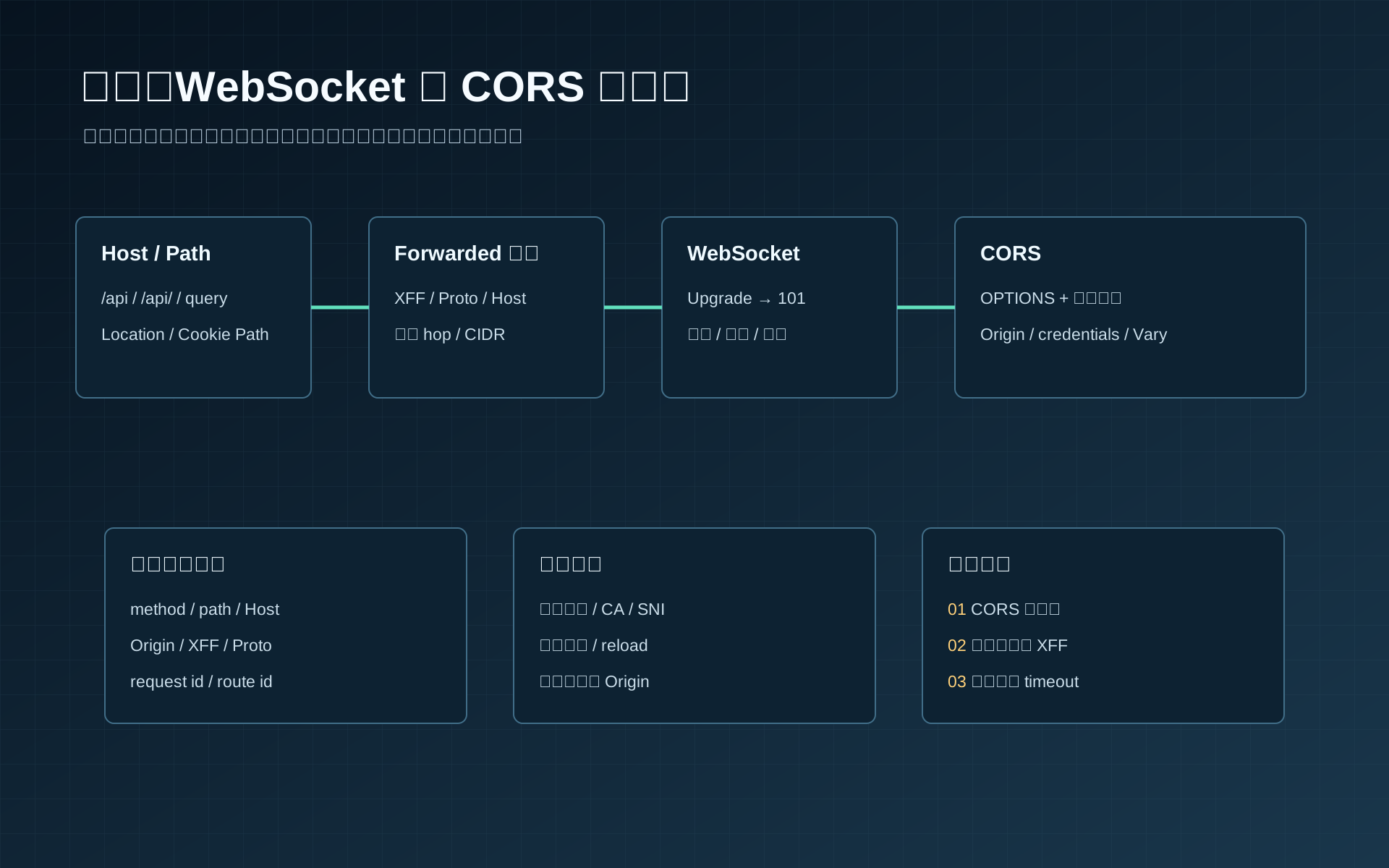
先让每一跳都能说清自己收到了什么
网关故障最难处理的部分,通常不是配置语法,而是同一个请求在浏览器、网关和应用三处呈现出不同事实。浏览器显示 CORS 错误,网关日志只有一个 404,应用却声称没有收到请求;如果没有稳定的回显服务和 request id,排障只能靠猜。
下面使用一条固定链路进行实验:
浏览器或命令行客户端
  -> gateway.localhost:8080
  -> echo.internal:9000
实验域名写入本机 hosts:
127.0.0.1 gateway.localhost
127.0.0.1 web.localhost
127.0.0.1 attacker.localhost
127.0.0.1 echo.internal
四种网关共用 8080,因此一次只运行一个。实验基线固定为 Nginx 1.28.3、Caddy 2.11.4、Traefik 3.7.1 和 Envoy 1.38.0;从各自官方 release 或软件包入口安装后,先执行 nginx -v、caddy version、traefik version、envoy --version 记录实际二进制。切换实现时先正常停止前一个进程,确认 8080 已释放,再启动下一个。websocat 从官方仓库的 release 或安装说明获取,并把实际版本写入实验记录。
先准备一个同时支持 HTTP、延迟响应、浏览器 CORS 和 WebSocket 的上游。Node.js 20 及以上版本可以直接运行下面的实验服务:
mkdir gateway-lab
cd gateway-lab
npm init -y
npm install --save-exact ws@8.21.0
创建 echo.mjs:
import http from "node:http";
import { setTimeout as delay } from "node:timers/promises";
import { WebSocketServer } from "ws";

const allowedWsOrigin = "http://web.localhost:3000";
const server = http.createServer(async (req, res) => {
  const rawPath = req.url.split("?", 1)[0];
  if (/(?:%2f|%5c|%2e|\/\/)/i.test(rawPath)) {
    res.writeHead(400, { "content-type": "text/plain; charset=utf-8" });
    res.end("ambiguous path rejected");
    return;
  }

  const url = new URL(req.url, "http://echo.internal");
  const waitMs = Math.min(Number(url.searchParams.get("ms") || 0), 30000);

  if (url.pathname === "/delay" && waitMs > 0) {
    await delay(waitMs);
  }

  const response = {
    method: req.method,
    rawUrl: req.url,
    path: url.pathname,
    query: url.search,
    host: req.headers.host || null,
    origin: req.headers.origin || null,
    forwardedFor: req.headers["x-forwarded-for"] || null,
    forwardedHost: req.headers["x-forwarded-host"] || null,
    forwardedProto: req.headers["x-forwarded-proto"] || null,
    requestId: req.headers["x-request-id"] || null,
    httpVersion: req.httpVersion,
    peerIp: req.socket.remoteAddress,
  };

  res.writeHead(200, {
    "content-type": "application/json; charset=utf-8",
    "x-request-id": response.requestId || "missing",
  });
  res.end(JSON.stringify(response, null, 2));
});

const wss = new WebSocketServer({ noServer: true, maxPayload: 64 * 1024 });
wss.on("connection", (socket, request) => {
  socket.isAlive = true;
  socket.on("pong", () => { socket.isAlive = true; });
  socket.send(JSON.stringify({ event: "connected", requestId: request.headers["x-request-id"] }));
  socket.on("message", (data) => socket.send(data));
});

const heartbeat = setInterval(() => {
  for (const socket of wss.clients) {
    if (!socket.isAlive) {
      socket.terminate();
      continue;
    }
    socket.isAlive = false;
    socket.ping();
  }
}, 25000);

server.on("upgrade", (req, socket, head) => {
  const url = new URL(req.url, "http://echo.internal");
  if (url.pathname !== "/socket") {
    socket.end("HTTP/1.1 404 Not Found\r\nConnection: close\r\n\r\n");
    return;
  }
  if (req.headers.origin !== allowedWsOrigin) {
    socket.end("HTTP/1.1 403 Forbidden\r\nConnection: close\r\n\r\n");
    return;
  }
  wss.handleUpgrade(req, socket, head, (ws) => wss.emit("connection", ws, req));
});

server.listen(9000, "127.0.0.1", () => {
  console.log("echo upstream listening on 127.0.0.1:9000");
});

const browserPage = `<!doctype html><meta charset="utf-8"><pre id="result">running</pre><script>
fetch("http://gateway.localhost:8080/api/users?id=browser", {
  credentials: "include",
  headers: { "X-Request-ID": "cors-browser-001" }
}).then(async (response) => {
  const body = await response.text();
  document.querySelector("#result").textContent = JSON.stringify({ ok: true, status: response.status, body });
}).catch((error) => {
  document.querySelector("#result").textContent = JSON.stringify({ ok: false, name: error.name, message: error.message });
});
</script>`;

const webServer = http.createServer((_req, res) => {
  res.writeHead(200, { "content-type": "text/html; charset=utf-8" });
  res.end(browserPage);
});
webServer.listen(3000, "127.0.0.1", () => {
  console.log("browser fixture listening on 127.0.0.1:3000");
});

process.on("SIGINT", () => {
  clearInterval(heartbeat);
  for (const socket of wss.clients) socket.terminate();
  wss.close();
  webServer.close();
  server.close();
});
终端 A 执行 node echo.mjs 并保持运行;终端 B 负责后续 curl、浏览器和网关命令。终端 A 应同时看到 9000 与 3000 两个 listener。先在终端 B 绕过网关访问上游:
node echo.mjs
curl -sS -H 'Host: echo.internal' \
  -H 'X-Request-ID: direct-001' \
  'http://127.0.0.1:9000/users?id=1'
成功标准是状态码 200,path 为 /users,query 为 ?id=1,host 为 echo.internal。如果直连已经失败,应先处理上游监听地址、端口、防火墙或进程错误;此时修改网关不会产生有效证据。
诊断接口只能存在于本机或隔离测试网络。生产环境不应回显 Authorization、Cookie、请求体、真实客户 IP 或 query 中的凭证,访问日志也要对这些字段执行删除或脱敏。
把入口行为写成唯一契约
所有实现采用同一组外部行为。语法可以不同,客户端和上游观察到的结果不能漂移。
| 客户端请求 | 命中规则 | 上游 path | 上游 query | 上游 Host |
|---|---|---|---|---|
/api | api-root | / | 原样保留 | echo.internal |
/api/ | api-prefix | / | 原样保留 | echo.internal |
/api/users?id=1 | api-prefix | /users | ?id=1 | echo.internal |
/ws?room=blue | websocket | /socket | ?room=blue | echo.internal |
入口按规范化后的主机名白名单接受 gateway.localhost,客户端是否显式携带端口、DNS 形式是否带根域尾点由 HTTP 栈和产品的 authority 规范化决定;其他主机名必须拒绝。进入可信路由后,网关把转发 authority 统一写成实验入口常量,避免把未经校验的原始 Host 继续传给上游。若某个实现不接受尾点,证据应是入口本地拒绝,不能放行到另一条业务路由:
Host: echo.internal
X-Forwarded-Host: gateway.localhost:8080
X-Forwarded-Proto: http
X-Forwarded-For: 由可信代理算法计算的客户端地址
X-Request-ID: 实验客户端提供的 1 到 64 位字母、数字、点、下划线或连字符
所有实验命令都显式发送合法 case id,四种配置只需保留该值,避免把不同产品的默认生成策略混进对照结果。生产入口则应由最外层可信代理校验、生成或覆盖 request id,并限制长度与字符集;内部代理只负责继续传递。Envoy 示例显式保留外部 id,是因为实验客户端就是可信测试主体,这个选项不能无条件照搬到公网入口。
CORS 决策也固定下来:
| 项目 | 决策 |
|---|---|
| 允许的 Origin | http://web.localhost:3000 |
| methods | GET, POST, OPTIONS |
| request headers | content-type, x-request-id |
| expose headers | x-request-id |
| credentials | 允许 |
| preflight cache | 600 秒 |
| 决策位置 | 网关是唯一 CORS 决策点 |
WebSocket 使用 ws://gateway.localhost:8080/ws,Origin 必须是 http://web.localhost:3000。实验服务每 25 秒发送 ping,并终止没有 pong 的连接。支持 stream idle timeout 的网关把目标设为 75 秒;Traefik 示例只验证应用心跳,没有配置 stream idle 或最大连接寿命,这个缺口必须由应用会话策略或外层入口补齐,不能拿 keep-alive 参数冒充。
普通 HTTP 的预算目标为:连接上游 3 秒、等待响应头 10 秒、单请求总时长 15 秒。各产品并不都能在同一层精确表达三项;配置必须注明实际生效阶段,并分别用 11 秒与 16 秒延迟实验观察差异。生产数值应由业务 SLO 推导。
Nginx:显式处理 URI、转发头和 Upgrade
Nginx 的 proxy_pass 是否带 URI 会改变替换规则,尾斜杠不是格式偏好。下面把 /api 与 /api/ 分成两条 location,避免依赖隐含跳转。
events {}

http {
    map $http_upgrade $connection_upgrade {
        default upgrade;
        ''      close;
    }

    map $http_origin $cors_origin {
        default                         "";
        "http://web.localhost:3000"    $http_origin;
    }

    map $http_x_request_id $request_id_safe {
        default                         $request_id;
        "~^[A-Za-z0-9._-]{1,64}$"       $http_x_request_id;
    }

    map $request_uri $raw_path {
        ~^([^?]*)                       $1;
    }

    log_format gateway_lab escape=json
      '{"time":"$time_iso8601",'
      '"request_id":"$request_id_safe",'
      '"route":"$route_id",'
      '"uri":"$uri",'
      '"host":"$host",'
      '"remote_addr":"$remote_addr",'
      '"upstream_addr":"$upstream_addr",'
      '"upstream_status":"$upstream_status",'
      '"status":$status,'
      '"request_time":$request_time,'
      '"upstream_time":"$upstream_response_time"}';

    upstream echo_backend {
        server 127.0.0.1:9000;
        keepalive 16;
    }

    server {
        listen 8080 default_server;
        server_name _;
        return 404;
    }

    server {
        listen 8080;
        server_name gateway.localhost;
        access_log /tmp/gateway-lab.json gateway_lab;

        if ($raw_path ~* "(?:%2f|%5c|%2e|//)") {
            return 400;
        }

        add_header Access-Control-Allow-Origin $cors_origin always;
        add_header Access-Control-Allow-Credentials "true" always;
        add_header Access-Control-Allow-Methods "GET, POST, OPTIONS" always;
        add_header Access-Control-Allow-Headers "content-type, x-request-id" always;
        add_header Access-Control-Expose-Headers "x-request-id" always;
        add_header Access-Control-Max-Age "600" always;
        add_header Vary "Origin" always;

        if ($request_method = OPTIONS) {
            return 204;
        }

        location = /api {
            set $route_id api-root;
            proxy_pass http://echo_backend/;
            proxy_set_header Host echo.internal;
            proxy_set_header X-Forwarded-Host gateway.localhost:8080;
            proxy_set_header X-Forwarded-Proto $scheme;
            proxy_set_header X-Forwarded-For $remote_addr;
            proxy_set_header X-Request-ID $request_id_safe;
            proxy_connect_timeout 3s;
            proxy_read_timeout 10s;
            proxy_send_timeout 10s;
        }

        location ^~ /api/ {
            set $route_id api-prefix;
            proxy_pass http://echo_backend/;
            proxy_set_header Host echo.internal;
            proxy_set_header X-Forwarded-Host gateway.localhost:8080;
            proxy_set_header X-Forwarded-Proto $scheme;
            proxy_set_header X-Forwarded-For $remote_addr;
            proxy_set_header X-Request-ID $request_id_safe;
            proxy_connect_timeout 3s;
            proxy_read_timeout 10s;
            proxy_send_timeout 10s;
        }

        location = /ws {
            set $route_id websocket;
            proxy_http_version 1.1;
            proxy_pass http://echo_backend/socket;
            proxy_set_header Host echo.internal;
            proxy_set_header X-Forwarded-Host gateway.localhost:8080;
            proxy_set_header X-Forwarded-Proto $scheme;
            proxy_set_header X-Forwarded-For $remote_addr;
            proxy_set_header X-Request-ID $request_id_safe;
            proxy_set_header Upgrade $http_upgrade;
            proxy_set_header Connection $connection_upgrade;
            proxy_read_timeout 75s;
            proxy_send_timeout 75s;
        }
    }
}
终端 C 检查并加载配置;Nginx 默认进入后台,切换到其他网关前执行 nginx -s quit:
nginx -t -c /absolute/path/to/nginx.conf
nginx -c /absolute/path/to/nginx.conf
nginx -s reload
nginx -s quit
nginx -t 必须返回 syntax is ok 和 test is successful。请求 /api/users?id=1 后,上游回显应包含 path=/users、query=?id=1、host=echo.internal。如果 path 仍为 /api/users,先检查实际命中的 location 和 proxy_pass 是否带结尾 /;如果 query 消失,检查配置中是否使用变量重新拼装 URI。
Nginx 官方的 proxy_pass 文档应与实际运行版本一起核对。WebSocket 的 Upgrade 和 Connection 是 hop-by-hop 头,反向代理需要显式传给上游,具体行为见 WebSocket proxying。
Caddy:用 handle_path 表达前缀剥离
Caddy 的 handle_path 会剥离匹配前缀。精确 /api 仍需独立处理,否则根路径与尾斜杠可能产生不同结果。
{
    admin localhost:2019
}

(echo_proxy) {
    header_up Host echo.internal
    header_up X-Forwarded-Host gateway.localhost:8080
    header_up X-Forwarded-Proto {http.request.scheme}
    header_up X-Request-ID {http.request.header.X-Request-ID}
    transport http {
        dial_timeout 3s
        response_header_timeout 10s
    }
}

http://gateway.localhost:8080 {
    log {
        output file ./gateway-lab.json
        format json
    }

    @allowed_origin header Origin http://web.localhost:3000
    @preflight {
        method OPTIONS
        header Origin http://web.localhost:3000
        header Access-Control-Request-Method *
    }

    handle @preflight {
        header Access-Control-Allow-Origin "http://web.localhost:3000"
        header Access-Control-Allow-Credentials "true"
        header Access-Control-Allow-Methods "GET, POST, OPTIONS"
        header Access-Control-Allow-Headers "content-type, x-request-id"
        header Access-Control-Expose-Headers "x-request-id"
        header Access-Control-Max-Age "600"
        header Vary "Origin"
        respond "" 204
    }

    handle {
        header @allowed_origin Access-Control-Allow-Origin "{http.request.header.Origin}"
        header @allowed_origin Access-Control-Allow-Credentials "true"
        header @allowed_origin Access-Control-Expose-Headers "x-request-id"
        header @allowed_origin Vary "Origin"

        handle /api {
            rewrite * /
            reverse_proxy 127.0.0.1:9000 {
                import echo_proxy
            }
        }

        handle_path /api/* {
            reverse_proxy 127.0.0.1:9000 {
                import echo_proxy
            }
        }

        handle /ws {
            rewrite * /socket
            reverse_proxy 127.0.0.1:9000 {
                import echo_proxy
                stream_timeout 24h
                stream_close_delay 5m
            }
        }

        respond "route not found" 404
    }
}
终端 C 检查后使用后台模式启动;终端 B 执行请求和 reload,切换网关前停止 Caddy:
caddy validate --config ./Caddyfile --adapter caddyfile
caddy start --config ./Caddyfile --adapter caddyfile
caddy reload --config ./Caddyfile --adapter caddyfile
caddy stop
caddy validate 应返回 Valid configuration。相同请求仍应得到 /users?id=1。如果得到 /api/users,说明请求绕过了 handle_path;如果 /api 返回 404,说明缺少精确路径分支。
Caddy 会原生建立 WebSocket 双向隧道,但配置 reload 可能关闭旧连接;stream_close_delay 用于降低大量客户端同时重连的冲击。行为和选项见 reverse_proxy 与 handle_path。
实验链路由客户端直接连接 Caddy,因此不配置可信上游代理。当前面存在 CDN 或负载均衡器时,应在全局 server 选项中按真实 CIDR 配置 trusted_proxies;不能为了让 XFF “看起来正确”而信任所有私网或任意来源。
Traefik:把匹配、middleware 和 service 分开取证
Traefik 的路由器决定是否命中,middleware 改写请求,service 决定上游。排障时要记录 router name、middleware chain 和 service name,不能只看最终状态码。
静态配置 traefik-static.yaml:
entryPoints:
  web:
    address: ":8080"
    transport:
      respondingTimeouts:
        readTimeout: "30s"
        writeTimeout: "0s"
        idleTimeout: "75s"

providers:
  file:
    filename: ./traefik-dynamic.yaml
    watch: true

accessLog:
  format: json
  filePath: ./gateway-lab.json
  fields:
    defaultMode: keep

api:
  dashboard: true
  insecure: false
动态配置 traefik-dynamic.yaml:
http:
  routers:
    api-root:
      entryPoints: [web]
      rule: "Host(`gateway.localhost`) && Path(`/api`)"
      priority: 110
      middlewares: [api-root-path, cors-policy, upstream-host]
      service: echo

    api-prefix:
      entryPoints: [web]
      rule: "Host(`gateway.localhost`) && PathPrefix(`/api/`)"
      priority: 100
      middlewares: [strip-api, cors-policy, upstream-host]
      service: echo

    websocket:
      entryPoints: [web]
      rule: "Host(`gateway.localhost`) && Path(`/ws`)"
      priority: 120
      middlewares: [websocket-path, upstream-host]
      service: echo

  middlewares:
    api-root-path:
      replacePath:
        path: /

    strip-api:
      stripPrefix:
        prefixes: [/api]

    websocket-path:
      replacePath:
        path: /socket

    upstream-host:
      headers:
        customRequestHeaders:
          Host: echo.internal
          X-Forwarded-Host: gateway.localhost:8080

    cors-policy:
      headers:
        accessControlAllowCredentials: true
        accessControlAllowMethods: [GET, POST, OPTIONS]
        accessControlAllowHeaders: [content-type, x-request-id]
        accessControlExposeHeaders: [x-request-id]
        accessControlAllowOriginList:
          - "http://web.localhost:3000"
        accessControlMaxAge: 600
        addVaryHeader: true

  services:
    echo:
      loadBalancer:
        passHostHeader: true
        serversTransport: bounded-timeouts
        servers:
          - url: "http://127.0.0.1:9000"

  serversTransports:
    bounded-timeouts:
      forwardingTimeouts:
        dialTimeout: "3s"
        responseHeaderTimeout: "10s"
        idleConnTimeout: "75s"
终端 C 启动 Traefik 并保持前台运行,终端 B 执行请求;切换网关时在终端 C 按 Ctrl+C,确认 8080 已释放:
traefik --configFile=./traefik-static.yaml --log.level=DEBUG启动日志不得出现 static configuration、file provider 或字段解析错误,并应显示 web entryPoint 开始监听。请求成功后,access log 中应出现 RouterName=api-prefix@file 和 ServiceName=echo@file,上游回显的 host 必须是 echo.internal。若 Host 变成 127.0.0.1:9000,检查 passHostHeader 与 customRequestHeaders.Host 是否互相覆盖。404 且没有 router name 表示规则没有命中;命中了 router 但得到上游 404,再检查 StripPrefix 后的 path。动态文件修改后若 provider 日志报错,Traefik 会继续使用旧配置,必须修复错误并确认新配置已被加载,不能把“进程仍存活”当作变更成功。
Traefik 的 entryPoint idleTimeout 管理下游 HTTP keep-alive,serversTransport 的 idleConnTimeout 管理上游连接池中的空闲连接;二者都不是活跃 WebSocket 隧道的 stream idle timeout。这个实现依靠应用 ping/pong 检测失活连接,不能把 75 秒参数写成 WebSocket 流预算。
Traefik 的 WebSocket 不需要伪造额外开关。CORS middleware 会直接响应合法预检,预检不会进入 service,因此“上游没有 OPTIONS 日志”可以是正确结果。应结合 Routers、WebSocket 和 Headers middleware 判断当前配置。
实验配置没有可信前置代理,因此不设置 forwardedHeaders.trustedIPs。生产值必须来自真实边缘代理地址段并纳入变更管理,不能为了通过测试而加入客户端地址段,也不能把 0.0.0.0/0 加入信任列表。
Envoy:让 route name 和 response details 成为一等证据
Envoy 可以在 route 层独立设置 rewrite、Host、超时和 Upgrade。下面的 bootstrap 使用直接客户端模型,所以 xff_num_trusted_hops 为 0;如果前面增加边缘代理,必须重新设计原始 IP 检测,而不是盲目把数字加一。
static_resources:
  listeners:
    - name: gateway_listener
      address:
        socket_address:
          address: 0.0.0.0
          port_value: 8080
      filter_chains:
        - filters:
            - name: envoy.filters.network.http_connection_manager
              typed_config:
                "@type": type.googleapis.com/envoy.extensions.filters.network.http_connection_manager.v3.HttpConnectionManager
                stat_prefix: gateway
                use_remote_address: true
                xff_num_trusted_hops: 0
                skip_xff_append: false
                preserve_external_request_id: true
                normalize_path: true
                merge_slashes: false
                path_with_escaped_slashes_action: REJECT_REQUEST
                stream_idle_timeout: 75s
                route_config:
                  name: local_routes
                  virtual_hosts:
                    - name: gateway_localhost
                      domains: ["gateway.localhost", "gateway.localhost:8080"]
                      response_headers_to_add:
                        - header:
                            key: Vary
                            value: Origin
                          append_action: OVERWRITE_IF_EXISTS_OR_ADD
                      typed_per_filter_config:
                        envoy.filters.http.cors:
                          "@type": type.googleapis.com/envoy.extensions.filters.http.cors.v3.CorsPolicy
                          allow_origin_string_match:
                            - exact: "http://web.localhost:3000"
                          allow_methods: "GET, POST, OPTIONS"
                          allow_headers: "content-type, x-request-id"
                          expose_headers: "x-request-id"
                          max_age: "600"
                          allow_credentials: true
                      routes:
                        - name: websocket
                          match:
                            path: /ws
                          route:
                            cluster: echo
                            prefix_rewrite: /socket
                            host_rewrite_literal: echo.internal
                            timeout: 0s
                            idle_timeout: 75s
                            upgrade_configs:
                              - upgrade_type: websocket

                        - name: api-root
                          match:
                            path: /api
                          route:
                            cluster: echo
                            prefix_rewrite: /
                            host_rewrite_literal: echo.internal
                            timeout: 15s

                        - name: api-prefix
                          match:
                            prefix: /api/
                          route:
                            cluster: echo
                            prefix_rewrite: /
                            host_rewrite_literal: echo.internal
                            timeout: 15s

                      request_headers_to_add:
                        - header:
                            key: X-Forwarded-Host
                            value: "gateway.localhost:8080"
                          append_action: OVERWRITE_IF_EXISTS_OR_ADD
                        - header:
                            key: X-Forwarded-For
                            value: "%DOWNSTREAM_REMOTE_ADDRESS_WITHOUT_PORT%"
                          append_action: OVERWRITE_IF_EXISTS_OR_ADD
                        - header:
                            key: X-Forwarded-Proto
                            value: "http"
                          append_action: OVERWRITE_IF_EXISTS_OR_ADD
                http_filters:
                  - name: envoy.filters.http.cors
                    typed_config:
                      "@type": type.googleapis.com/envoy.extensions.filters.http.cors.v3.Cors
                  - name: envoy.filters.http.router
                    typed_config:
                      "@type": type.googleapis.com/envoy.extensions.filters.http.router.v3.Router
                access_log:
                  - name: envoy.access_loggers.stdout
                    typed_config:
                      "@type": type.googleapis.com/envoy.extensions.access_loggers.stream.v3.StdoutAccessLog
                      log_format:
                        json_format:
                          start_time: "%START_TIME%"
                          request_id: "%REQ(X-REQUEST-ID)%"
                          route: "%ROUTE_NAME%"
                          authority: "%REQ(:AUTHORITY)%"
                          path: "%REQ(X-ENVOY-ORIGINAL-PATH?:PATH)%"
                          response_code: "%RESPONSE_CODE%"
                          response_flags: "%RESPONSE_FLAGS%"
                          response_details: "%RESPONSE_CODE_DETAILS%"
                          upstream_host: "%UPSTREAM_HOST%"
                          duration_ms: "%DURATION%"

  clusters:
    - name: echo
      type: STATIC
      connect_timeout: 3s
      load_assignment:
        cluster_name: echo
        endpoints:
          - lb_endpoints:
              - endpoint:
                  address:
                    socket_address:
                      address: 127.0.0.1
                      port_value: 9000

admin:
  address:
    socket_address:
      address: 127.0.0.1
      port_value: 9901
终端 C 先检查,再启动 Envoy 并保持前台运行;终端 B 执行请求,切换网关时在终端 C 按 Ctrl+C:
envoy --mode validate -c ./envoy.yaml
envoy -c ./envoy.yaml
验证模式必须以退出码 0 结束。访问 /api/users?id=1 后,日志中的 route 应为 api-prefix,上游回显 path 应为 /users。如果日志中的 response_details 是 route_not_found,先核对 Host 与 path;如果 route 正确但 UPSTREAM_HOST 为空,则继续检查 cluster 健康和连接错误。
HTTP/1.1 Upgrade、每路由开关和 HTTP filter chain 的关系见 Envoy HTTP upgrades。HTTP/2 或 HTTP/3 hop 上的 WebSocket 默认不是普通 HTTP/1.1 Upgrade,需要 Extended CONNECT 及相应协议选项,不能从这份 HTTP/1.1 实验配置推断其已经启用。CORS filter 的直接预检行为见 Envoy CORS filter。
Path 和 query 必须分别观察
URI 重写不能按普通字符串替换理解。至少有四层会改变结果:路由匹配前的规范化、前缀剥离、上游 URI 拼装、应用框架自身的 base path。
先运行基础矩阵:
curl -sS --path-as-is --resolve gateway.localhost:8080:127.0.0.1 \
  -H 'X-Request-ID: route-001' \
  'http://gateway.localhost:8080/api'

curl -sS --path-as-is --resolve gateway.localhost:8080:127.0.0.1 \
  -H 'X-Request-ID: route-002' \
  'http://gateway.localhost:8080/api/'

curl -sS --path-as-is --resolve gateway.localhost:8080:127.0.0.1 \
  -H 'X-Request-ID: route-003' \
  'http://gateway.localhost:8080/api/users?id=1&id=2&empty='
三个预期 path 依次为 /、/、/users。第三个请求的 query 必须保持 ?id=1&id=2&empty=,不能重排、去重或丢弃空值。失败时同时保存客户端原始 URL、网关 route name、上游 rawUrl 和配置摘要;只有应用回显不足以证明是哪一跳改变了 URI。
再测试编码和规范化:
curl -i --path-as-is --resolve gateway.localhost:8080:127.0.0.1 \
  -H 'X-Request-ID: path-encoded-slash-001' \
  'http://gateway.localhost:8080/api/a%2Fb'

curl -i --path-as-is --resolve gateway.localhost:8080:127.0.0.1 \
  -H 'X-Request-ID: path-double-slash-001' \
  'http://gateway.localhost:8080/api//users'

curl -i --path-as-is --resolve gateway.localhost:8080:127.0.0.1 \
  -H 'X-Request-ID: path-dot-segment-001' \
  'http://gateway.localhost:8080/api/%2e%2e/admin'
这组实验采用确定的失败关闭策略:三条请求都必须返回 4xx,不能得到业务 200,也不能进入受保护 handler。Nginx 在 default server 中检查原始 request URI;Envoy 直接拒绝 escaped slash;Caddy 或 Traefik 若在路由前已经完成规范化,未命中 API 路由时返回 404,仍然命中时由实验服务的 raw URL 守卫返回 400。生产系统不能只依赖最后一道应用守卫,应在所选网关、WAF 或扩展层实现同一策略并保存拒绝计数。
四种产品对解码、点段和重复斜杠的处理时机并不相同,因此共同契约约束的是“不得成功进入业务”,不是伪造一个相同内部路径。涉及签名、对象存储 key 或安全路由时,还要同时保存入口 raw path、网关规范化结果与应用看到的 path;升级后复跑这三个 case,任何 2xx 都是阻断发布的回归。
Location、Cookie Path、静态资源绝对 URL、OpenAPI server URL 和 OAuth redirect URI 也会受前缀剥离影响。修复 rewrite 后,应重新访问会产生重定向和 Set-Cookie 的真实业务接口,不能用一个 JSON 回显代替全部回归。
Host、authority、XFH 和 SNI 是四个不同事实
HTTP/1.1 使用 Host,HTTP/2 和 HTTP/3 使用 :authority。网关路由可能读取外部 authority,上游虚拟主机可能要求内部 Host,HTTPS upstream 又使用 SNI 选择证书。这三个值可以相同,也可以不同,但必须由契约决定。
当前实验的关系是:
外部 Host / :authority  = 主机名必须为 gateway.localhost,端口可由客户端显式携带
上游 HTTP Host          = echo.internal
X-Forwarded-Host        = gateway.localhost:8080
上游 TLS SNI            = 未使用,因为实验上游是 HTTP
使用伪造 Host 做负向测试:
curl -i -H 'Host: attacker.example' \
  -H 'X-Request-ID: host-evil-001' \
  'http://127.0.0.1:8080/api/users?id=1'
预期是网关 404 或明确拒绝,不能把请求送到默认上游。若应用收到请求,Host 路由存在兜底过宽问题;若响应中的重定向跳到 attacker.example,应用或网关正在使用未验证 Host 生成绝对 URL,存在开放重定向和缓存投毒风险。
当上游改成 https://api.internal:9443 时,还要分别配置:
上游 TCP 目标为 api.internal:9443。TLS ServerName 为证书中的 api.internal。开启证书链与主机名验证。
上游 HTTP Host 按虚拟主机要求设置。原始 public Host 仍通过受控 XFH 提供给需要生成外部 URL 的应用。
不能通过关闭证书验证来解决 SNI 或 CA 错误。修复后应同时看到 TLS 握手成功、上游 Host 正确和应用生成的 public URL 正确。
X-Forwarded-For 必须从连接对端向外剥离
可信代理算法处理的是“连接对端 + header 链”,不是从字符串中固定取第一个或最后一个地址。安全判断顺序如下:
读取当前 TCP peer IP。peer 不在可信代理 CIDR 时,忽略客户端传入的 XFF,客户端地址就是 peer。peer 可信时,从 XFF 最右侧开始向左剥离连续可信代理。
遇到第一个不可信地址时,将其作为候选客户端地址。地址解析失败、链过长或同时出现冲突的 Forwarded / XFF 时,记录异常并使用失败关闭策略。
本机实验中客户端直接连接网关,所以伪造值必须被覆盖或忽略:
curl -sS --resolve gateway.localhost:8080:127.0.0.1 \
  -H 'X-Forwarded-For: 203.0.113.7, 10.0.0.8' \
  -H 'X-Forwarded-Proto: https' \
  -H 'X-Request-ID: xff-spoof-001' \
  'http://gateway.localhost:8080/api/users'
预期 client IP 是连接对端 127.0.0.1,Proto 是当前入口的 http,不能变成攻击者提供的 203.0.113.7 或 https。access log 与上游回显必须同时保存这个 case id。若伪造值生效,应立即停止使用 client IP 做白名单、限流或审计归属,并修复入口清理规则后复跑。
生产链路还要处理 IPv6、IPv4-mapped IPv6、CDN 地址段轮换和 PROXY protocol。PROXY protocol 必须由连接两端同时启用,并且接收端只允许可信负载均衡器访问;把普通 HTTP 流量送到 PROXY listener,或把 PROXY 字节送到普通 HTTP listener,都会产生协议级失败。
固定 hop 数只适合拓扑绝对稳定的链路。存在旁路入口、可选 CDN 或多区域代理时,应优先使用可信 CIDR 原始 IP检测,并为拓扑变化建立自动测试。
WebSocket 要验证完整生命周期
101 Switching Protocols 只证明握手完成,不能证明消息双向可达、心跳有效或发布期间连接可持续。使用真实客户端测试:
websocat -H='Origin: http://web.localhost:3000' \
  -H='X-Request-ID: ws-001' \
  'ws://gateway.localhost:8080/ws?room=blue'
连接建立后应先收到 connected 事件,输入 hello 后应收到相同消息。上游看到的 path 必须是 /socket,query 仍为 ?room=blue。ws 服务每 25 秒发送 ping,websocat 应自动返回 pong;连续运行 76 秒仍保持连接,可以证明应用心跳在工作。只有 Nginx 和 Envoy 示例还会同时经过明确的 stream/read idle 预算;Caddy 与 Traefik 的这项实验不能解释成等价的 75 秒流超时。随后依次执行:
保持业务消息空闲超过 75 秒,确认 ping/pong 让连接维持存活,并按产品注明实际约束阶段。停止上游,记录客户端 close code、网关日志和断开时间。恢复上游,重新执行 websocat 证明新连接可建立;websocat 本身不证明业务客户端的退避算法。
变更或重启网关,记录旧连接是继续、延迟关闭还是立即断开。发送超过 64 KiB 的消息,确认服务按约定拒绝,而不是无限缓存。
变更动作必须与产品生命周期对应:Nginx 执行 nginx -s reload;Caddy 执行 caddy reload 并观察 stream_close_delay;Traefik 修改动态文件与重启进程要分成两个 case;Envoy 静态配置不能靠普通 reload 生效,应单独验证进程重启、hot restart 或 xDS 更新。每个 case 都保存旧连接 close code、断开时间、新连接恢复时间和重连峰值。业务客户端还要独立证明指数退避、随机抖动和最大重试时间,不能从一次 websocat 重连推断。
拒绝 Origin 的对照:
websocat -H='Origin: http://attacker.example' \
  -H='X-Request-ID: ws-origin-001' \
  'ws://gateway.localhost:8080/ws'
预期握手得到 403,不能建立隧道。WebSocket 不执行浏览器 CORS 流程,服务端必须独立验证 Origin。认证使用 Cookie 时尤其要防范跨站 WebSocket 劫持;query token 容易进入日志、监控和浏览器历史,应优先使用短期票据或受控认证头,并确保日志删除凭证。
HTTP/1.1 链路依赖 Upgrade 与 Connection。HTTP/2 hop 不传递这组 hop-by-hop 头,而是使用 RFC 8441 Extended CONNECT;必须分别验证下游协议、网关间协议和上游协议。仅在浏览器开发者工具看到 WebSocket,不足以证明中间的 HTTP/2 mesh 配置正确。
容量治理还应限制每租户连接数、单连接消息大小、发送队列和慢消费者。过长 max duration 会让版本发布长期背负旧连接,过短则造成周期性重连;通常用心跳检测失活、drain 完成发布、最大寿命控制长期漂移,而不是关闭所有 timeout。
CORS 成功由浏览器语义决定
curl 可以观察响应头,但不会执行浏览器的 CORS 判定。一次预检返回成功的 2xx,并不等于浏览器允许后续请求;允许 Origin、method、request headers 和 credentials 必须同时满足。
允许的预检:
curl -i -X OPTIONS --resolve gateway.localhost:8080:127.0.0.1 \
  'http://gateway.localhost:8080/api/users' \
  -H 'Origin: http://web.localhost:3000' \
  -H 'X-Request-ID: cors-ok-001' \
  -H 'Access-Control-Request-Method: POST' \
  -H 'Access-Control-Request-Headers: content-type,x-request-id'
Nginx 与 Caddy 示例返回 204,Traefik Headers middleware 与 Envoy CORS filter 返回 200;浏览器接受成功的 2xx 预检。四种实现都必须至少包含:
Access-Control-Allow-Origin: http://web.localhost:3000
Access-Control-Allow-Credentials: true
Access-Control-Allow-Methods: GET, POST, OPTIONS
Access-Control-Allow-Headers: content-type, x-request-id
Vary: Origin
拒绝的 Origin:
curl -i -X OPTIONS --resolve gateway.localhost:8080:127.0.0.1 \
  'http://gateway.localhost:8080/api/users' \
  -H 'Origin: http://attacker.example' \
  -H 'X-Request-ID: cors-deny-001' \
  -H 'Access-Control-Request-Method: POST' \
  -H 'Access-Control-Request-Headers: content-type,x-request-id'
实现可以返回没有 ACAO 的 2xx,但响应不得出现允许攻击者 Origin 的 ACAO;浏览器会阻止实际跨域读取。若安全策略要求网关直接返回 403,也要把该行为写入契约并逐个实现,不能假定所有内置 CORS middleware 默认一致。
带凭证的实际请求:
curl -i --resolve gateway.localhost:8080:127.0.0.1 \
  'http://gateway.localhost:8080/api/users?id=1' \
  -H 'Origin: http://web.localhost:3000' \
  -H 'Cookie: session=lab-only' \
-H 'X-Request-ID: cors-credential-001'允许凭证时,Access-Control-Allow-Origin 必须返回精确 Origin,不能使用 *。还要测试不允许的 method、不允许的 request header、Origin: null、相似域名和默认端口差异。https://web.localhost、http://web.localhost 与 http://web.localhost:3000 是三个不同 Origin。
最后使用真实浏览器执行语义验证。终端 A 的浏览器 fixture 已监听 3000:
打开 http://web.localhost:3000/,页面应显示 {"ok":true,"status":200,...},Network 中能看到预检和实际请求。打开 http://attacker.localhost:3000/,页面应显示 {"ok":false,"name":"TypeError",...},Console 报告 CORS 拒绝;即使 Network 中能看到 HTTP 响应,脚本也不能读取正文。
在 DevTools 中保存两次请求的 Origin、预检响应头、实际响应头和 Console 结果,并用 cors-browser-001 关联网关与上游日志。
curl 负责核对协议头,浏览器负责证明 JavaScript 是否真的能读取响应,两份证据不能互相替代。自动回归可以用 Playwright 打开这两个 URL 并断言 #result,但仍应保存失败时的 Console 和 Network 证据。
网关和应用不能同时注入 CORS 头。重复 ACAO、一个 * 加一个精确 Origin、缺少 Vary: Origin 都可能导致浏览器失败或共享缓存把一个 Origin 的响应发给另一个 Origin。预检由网关直接返回时,还要确认认证、限流和审计链是否应该处理 OPTIONS;不能因为上游没有日志就默认请求从未发生。
CORS 不是认证、授权、CSRF 防护或网络隔离。浏览器能读取响应,只表示跨域读取策略允许;对象级权限仍由应用判断,不能通过放宽 Origin 修复 401 或 403。
超时预算要能解释每一种断线
不同产品使用不同名称,但需要治理的是同一组阶段:
| 阶段 | 实验目标 | 超时后常见证据 | 调整依据 |
|---|---|---|---|
| client header/body | 防慢请求占用连接 | 408、连接关闭、入口计数 | 合法请求头和上传速度 |
| upstream connect | 连接上游 | 502/503、connect timeout | 网络延迟和重试预算 |
| response header | 等待首字节 | 504、upstream timeout | 接口 P99 与冷启动 |
| request total | 限制普通请求总时长 | route timeout、取消上游 | 端到端 SLO |
| stream idle | 清理失活长连接 | 固定空闲时间断线 | 心跳周期的两到三倍 |
| max connection age | 淘汰长期旧连接 | 计划性 close code | 发布和证书轮换周期 |
| drain grace | 发布时迁移连接 | reload 后集中断线 | 客户端重连能力 |
利用上游延迟接口分别验证阶段预算:
time curl -i --resolve gateway.localhost:8080:127.0.0.1 \
  -H 'X-Request-ID: timeout-header-001' \
  'http://gateway.localhost:8080/api/delay?ms=11000'

time curl -i --resolve gateway.localhost:8080:127.0.0.1 \
  -H 'X-Request-ID: timeout-total-001' \
  'http://gateway.localhost:8080/api/delay?ms=16000'
Nginx、Caddy 和 Traefik 配置了约 10 秒的响应头等待,11 秒 case 应在该阶段失败;Envoy 示例只有 15 秒 route total,11 秒 case 应成功,16 秒 case 才由 route timeout 结束。这个差异是产品能力和配置层级的真实结果,不应被写成“完全等价”。若立即 502,通常不是响应超时,而是连接、端口或协议错误;若超过声明预算后仍返回 200,说明参数没有应用到实际命中的 route 或 service。
Caddy 示例中的 stream_timeout 24h 表示最大流持续时间,不是 75 秒 idle timeout;它依赖应用 ping/pong 发现失活连接。Traefik 的 entryPoint idle timeout 与上游连接池 idle timeout 也不约束活跃升级隧道。只有 Envoy stream_idle_timeout 和 Nginx proxy_read_timeout 在这组示例中承担流读取空闲约束,仍要用业务消息空闲 76 秒、持续有消息 76 秒和总时长三组 case 分开观察。
修复时先确认是哪一个阶段耗尽,再调整对应参数。把所有 timeout 设为无限会积累僵尸连接、慢消费者和资源泄漏;把外层超时设得短于内层重试预算,则会在下游已经放弃后继续消耗上游资源。
用证据矩阵代替“我这里可以”
每个 case 要在客户端、网关和上游三侧使用同一个 request id。建议把结果保存为结构化记录:
| case | 输入 | 预期 route | 预期上游事实 | 预期结果 | 必留证据 |
|---|---|---|---|---|---|
route-001 | /api | api-root | path / | 200 | client headers、route、echo |
route-002 | /api/ | api-prefix | path / | 200 | client headers、route、echo |
route-003 | /api/users?id=1&id=2&empty= | api-prefix | path /users,query 原样 | 200 | raw URL、route、echo |
route-query-001 | /api/users?next=http://example.com/a%2Fb | api-prefix | path /users,query 原样 | 200 | raw URL、route、echo |
host-evil-001 | Host attacker.example | 无 | 不到达上游 | 404/拒绝 | gateway response details |
host-port-001 | Host gateway.localhost:9999 | API route 或本地拒绝 | 接受时 XFH 规范化;拒绝时不到上游 | 200 或 404 | authority、echo |
host-canonical-001 | Host gateway.localhost | API route | XFH 规范化为 gateway.localhost:8080 | 200 | authority、echo |
host-trailing-dot-001 | Host gateway.localhost. | API route 或本地拒绝 | 接受时 XFH 仍规范化;拒绝时不到上游 | 200 或 404 | authority、route details |
path-encoded-slash-001 | /api/a%2Fb | 拒绝或守卫 | 不进入业务 handler | 4xx | raw path、拒绝层、status |
path-double-slash-001 | /api//users | 拒绝或守卫 | 不进入业务 handler | 4xx | raw path、拒绝层、status |
path-dot-segment-001 | /api/%2e%2e/admin | 拒绝或无路由 | 不进入业务 handler | 4xx | raw path、规范化结果、status |
xff-spoof-001 | 伪造 XFF/Proto | API route | client IP 为 peer | 200 | peer、清洗后 headers |
cors-ok-001 | 允许预检 | CORS 层 | 可不进上游 | 2xx + 允许头 | client、gateway CORS log |
cors-deny-001 | 拒绝 Origin | CORS 层 | 不授予跨域读取 | 无 ACAO/403 | 完整响应头 |
cors-browser-001 | 允许与恶意页面各一次 | CORS 层 | 允许页可读,恶意页不可读 | 浏览器断言 | Console、Network、gateway log |
ws-001 | 合法 Origin | websocket | /socket | 101 + 双向消息 | 握手、消息、close code |
ws-origin-001 | 非法 Origin | websocket | 上游拒绝 | 403 | gateway 与 upstream log |
timeout-header-001 | 延迟 11 秒 | api-prefix | 上游开始但未及时响应 | 按产品阶段预算 | duration、response details |
timeout-total-001 | 延迟 16 秒 | api-prefix | 上游开始但未及时响应 | route/上游 timeout | duration、response details |
证据记录至少包含时间、环境、配置版本或摘要、case id、客户端命令、状态码、关键响应头、route、upstream、response source/details 和上游回显。token、Cookie、请求体和真实用户数据必须在落盘前删除。
判断修复成功必须复跑同一个正向与负向 case。只看到状态从 500 变成 200 不够,还要确认请求没有命中错误上游、没有放宽安全策略,也没有丢失 Host、query 或客户端地址。
从响应来源判断失败归属
| 现象 | 优先检查 | 能定责的证据 | 常见修复 |
|---|---|---|---|
网关 404 | Host、path、router priority | route name 为空或 route_not_found | 收紧或修正规则 |
应用 404 | rewrite 与 base path | route 已命中,上游返回 404 | 修正前缀契约 |
502 | 连接、协议、TLS | connect reset、TLS error、无 upstream status | 修正地址、协议、CA/SNI |
503 | endpoint 与健康状态 | no healthy upstream、service unavailable | 恢复实例或健康检查 |
504 | 响应预算 | upstream timeout 与 duration | 治理慢请求或预算 |
| 无限重定向 | Proto、Host、public URL | 连续 Location 与 XFP | 修正 TLS 终止模型 |
WebSocket 返回 200 | Upgrade、路由、上游 endpoint | 请求/响应 Upgrade 头、route | 恢复 Upgrade 或正确 endpoint |
| 固定空闲时间断线 | idle timeout 与心跳 | 断线周期、ping/pong、close code | 协调心跳和 idle timeout |
| reload 后集中断线 | drain 行为 | reload 时间与连接关闭峰值 | 增加 drain/close delay |
预检 2xx 但浏览器失败 | CORS 响应语义 | DevTools console 与完整响应头 | 修正 Origin/method/headers |
| IP 白名单被绕过 | XFF 信任 | peer IP、原始链、解析结果 | 清理伪造头并限制 trusted CIDR |
404、503 等状态码不足以说明是谁产生的。网关日志应记录 route、upstream、response flags/details 和 request id;应用日志应记录同一个 request id。可以在隔离环境添加诊断响应头,但生产环境不要暴露内部节点名、文件路径或详细错误。
安全边界不能靠默认值碰运气
路径、Host、转发头和跨域规则都参与安全决策,配置评审至少要回答这些问题:
未知 Host 是否在入口拒绝,应用是否会用未验证 Host 生成链接。编码斜杠、双重解码、点段和重复斜杠由哪一层规范化。XFF、Forwarded、PROXY protocol 谁是权威,可信 CIDR 谁维护。
CORS Origin 是精确集合还是正则;正则是否会匹配相似恶意域名。WebSocket Origin、认证、消息大小、连接数和慢消费者如何限制。OAuth redirect URI、Cookie Domain/Path 和 public URL 是否来自受审配置。
上游 TLS 是否验证 CA、主机名和 SNI,证书轮换如何演练。debug endpoint、Dashboard 和 admin API 是否只监听本机或管理网络。access log 是否删除 Authorization、Cookie、token query 和业务数据。
配置错误时是否失败关闭,而不是自动放宽 Origin、Host 或证书检查。
Host 白名单、CORS 允许列表、可信代理 CIDR 和 redirect URI 都应进入代码评审与变更审计。它们不能由前端参数、用户请求头或临时环境变量任意替换。
回滚也要复跑相同证据
网关配置应以不可变版本或 Git 提交标识发布。变更前保存当前有效配置和配置摘要,变更后先跑 smoke matrix,再逐步放量。发现错误时执行:
停止继续放量。恢复上一份已知有效配置,而不是现场手改多个参数。使用产品自带检查命令验证回滚配置。
reload 或滚动替换,观察现有 WebSocket 的 drain 行为。复跑同一组 route、Host、XFF、CORS、WebSocket 和 timeout case。对比回滚前后的 route、upstream、响应头、close code 和错误率。
回滚成功的标准不是进程存活,而是旧契约恢复且负向安全用例仍被拒绝。若回滚会再次触发大量 WebSocket 重连,应先限制发布并发,确保客户端退避,再分批替换实例。
团队治理检查单
/api、/api/、深层路径、重复 query、redirect 和 Cookie Path 有确定预期。编码斜杠、重复斜杠、点段和双重解码策略在网关与应用间一致。外部 authority、上游 Host、XFH、public URL 和 TLS SNI 分别定义。
未知 Host 被入口拒绝,不能驱动重定向、缓存键或密码重置链接。XFF 由 peer IP 和可信 CIDR计算,伪造 XFF/Proto 的负向用例通过。CDN 地址段、IPv6 与 PROXY protocol 变化有 owner 和复测机制。
WebSocket 完成 101、双向消息、Origin、心跳、空闲、reload、上游故障和大消息测试。HTTP/1.1 Upgrade 与 HTTP/2 Extended CONNECT 分开配置和观察。CORS 验证允许与拒绝 Origin、method、headers、credentials、null Origin 和 Vary。
CORS 只有一个权威决策点,预检直返不会意外绕过安全策略。connect、response header、request、idle、max age 和 drain timeout 有预算依据。每个 case 保留 client、route、upstream、response details 和 request id 证据。
日志不保存 Authorization、Cookie、token query、请求体和真实业务数据。上一配置可恢复,并能复跑完全相同的正向与负向矩阵。